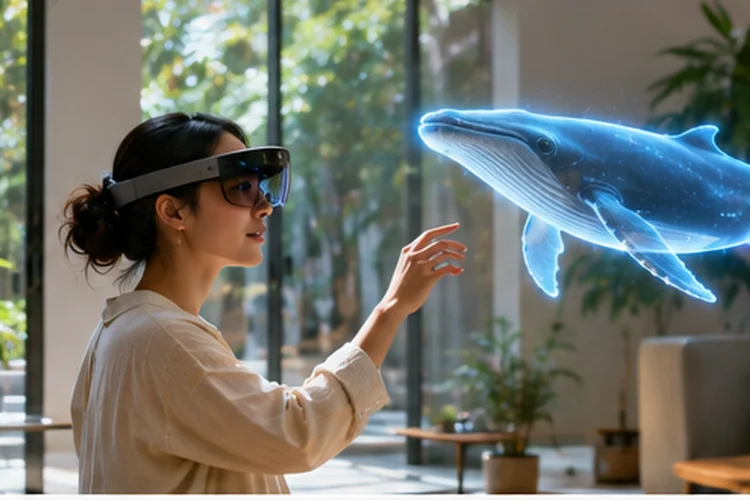
A holographic object floating above your kitchen table can look impressive until it slides through the wall or blocks the doorway.
That tiny mistake reminds people they’re using a simulation instead of something that belongs in their space. Realistic mixed reality needs more than attractive 3D models.
Designing Mixed-Reality Experiences around real-world context means understanding the room, respecting physical boundaries, and keeping virtual content stable as people move.
Whether you’re building an interactive museum guide or an at-home furniture preview, the environment should shape the experience from the very beginning.
Understand the Physical Environment Before Adding Content
Mixed reality combines digital objects with physical surroundings, but those surroundings are rarely predictable. A bright living room, narrow office, and crowded exhibition hall create very different conditions for spatial computing applications.
Before placing virtual content, the system needs to identify useful surfaces, estimate distances, and understand how the device moves through space.
Start With Environmental Understanding
Google’s ARCore documentation explains how environmental understanding identifies feature points and geometric planes, including horizontal and vertical surfaces. These capabilities help applications recognize tables, floors, and walls.
For example, a furniture visualization app can identify a floor before displaying a virtual sofa. This creates a more convincing preview than placing the object at an arbitrary position.
However, blank walls and reflective materials can make tracking less reliable. Always provide manual placement controls when automatic detection struggles.
Keep Virtual Objects Stable With Spatial Anchors
Imagine placing a digital sculpture on a table, walking around it, and discovering that the sculpture slowly drifts away. Even a small movement can make the experience feel unconvincing.
Spatial anchors help virtual content maintain a meaningful relationship with the physical enviroment. They provide reference points that tracking systems can update as their understanding of the surroundings improves.
Unity’s AR Foundation documentation explains why detected planes may change while tracking continues. Developers should choose suitable anchoring methods rather than assuming detected surfaces remain perfectly fixed.
Design for Tracking Interruptions
Tracking can become unreliable when lighting changes, the camera loses useful visual features, or someone moves through the scene.
Instead of allowing objects to jump unexpectedly, pause sensitive interactions and provide a clear recovery process. A simple message asking users to rescan their surroundings is often better than silently repositioning content.
Use Depth and Occlusion to Improve Realism
Virtual objects should appear behind physical furniture when appropriate, not float unnaturally over everything in view. This effect, called occlusion, helps digital content blend with the user’s environment.
Google’s Depth API creates depth information that can support realistic object placement, occlusion, and interactions with physical geometry.
For example, a virtual character walking through a living room should disappear behind a sofa when moving beyond it. Without depth awareness, the character might unrealistically appear in front of the furniture.
Depth accuracy also depends on hardware and environmental conditions. Google notes that depth estimates are generally most accurate at approximately 0.5 to 5 meters, although the supported range can extend farther.
Use quality checks before relying on depth information for important interactions.
Match Virtual Lighting and Scale to Reality
A perfectly modeled object can still look artificial when its lighting doesn’t match the room. Bright virtual highlights inside a dim environment create an obvious visual mismatch.
Modern AR frameworks can estimate environmental lighting and use that information to adjust digital materials. Matching brightness, color temperature, and shadows can make objects feel more physically connected to their surroundings.
Scale matters just as much. A virtual chair should appear proportionate to nearby furniture, while an interactive control should remain large enough to select comfortably.
Apple’s spatial layout guidance emphasizes natural depth cues, comfortable positioning, and careful use of visual space.
Avoid making every element enormous simply because immersive displays provide a large canvas. Well-chosen proportions create a more believable experience than oversized graphics.
Design Interactions Around Physical Comfort
Mixed reality introduces physical interaction into interface design. Users may need to look around, move their hands, or change position to interact with digital objects.
However, unnecessary movement can quickly become tiring. Microsoft recommends considering hologram distance, head movement, and visual comfort when designing mixed-reality interfaces.
For instance, a virtual training application should not require someone to repeatedly reach above their head to select basic controls.
Place frequently used interactions within a comfortable viewing area. Support indirect selection when reaching toward an object would feel awkward.
It’s also important to preserve visibility of real obstacles. A noticable virtual overlay should never hide a staircase or doorway when someone needs to move safely.
Test Against Unpredictable Real-World Conditions
A mixed-reality prototype may perform beautifully in a controlled studio while failing in ordinary homes. Different lighting conditions, furniture arrangements, surface materials, and room sizes can expose weaknesses.
Build testing scenarios that reflect realistic environments rather than repeatedly using one familiar room.
Consider a museum application that places historical reconstructions beside physical exhibits. Test whether its objects remain stable during busy visiting hours, when people move between exhibits and temporarily block tracking features.
Measure placement accuracy, tracking interruptions, interaction completion, and user comfort. Keep visual performance seperate from usability when analyzing the results.
A technically impressive scene may still require improvement if participants struggle to understand where content belongs.
Designing Mixed-Reality Experiences for real spaces starts with accurate environmental understanding, reliable placement, and comfortable interactions.
Depth, lighting, and tracking matter, but thoughtful fallbacks matter just as much when real rooms behave unpredictably.
Build a small prototype in three very different spaces, document where it fails, and refine the experience before adding more impressive visual effects.