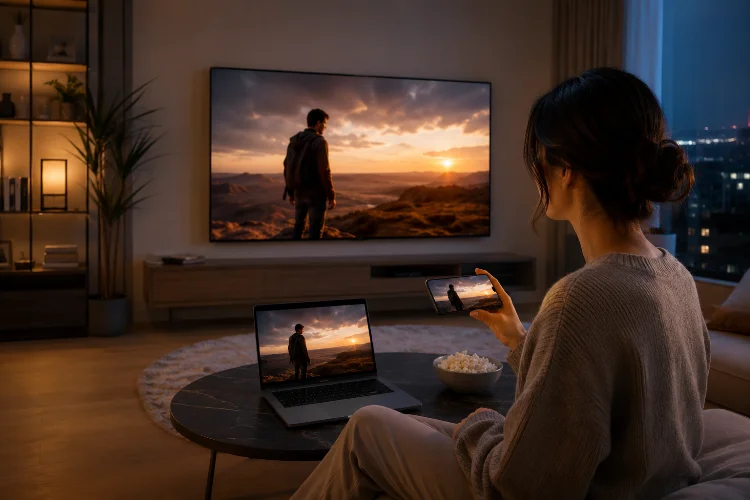
A viewer starts an episode on a phone during lunch, continues it in a browser at work, and finishes it on the living-room TV that evening.
From their perspective, this should feel like one viewing session-not three separate products trying to remember what happened.
That is the goal of Designing Content Continuity. Modern media platforms need to preserve playback position, identity, preferences, discovery context, and relevant settings as audiences move between screens.
The difficult part is creating continuity without pretending phones, browsers, and televisions should provide exactly the same interface.
Think of Continuity as a State Problem
Cross-device continuity begins with understanding what needs to survive when someone changes screens.
Playback position is the obvious example, but it is only one piece. A useful state model may also include the active episode, profile, watchlist, subtitle language, audio track, playback speed, completed episodes, and recommendation history.
The mistake is storing important state independently inside every client.
If the mobile app believes an episode is 60% complete while the TV believes it is 35% complete, the user becomes responsible for resolving a system problem.
Define an authoritative source for important account-level state and establish clear rules for updating it. The interface can vary, but the underlying history should remain consistant.
Make Resume Playback Feel Invisible
People should rarely need to think about resuming content.
When they open an unfinished title, the service should know approximately where they stopped and provide the right continuation behavior.
Save position frequently enough to prevent meaningful progress loss, but avoid treating every second of playback as a critical server transaction.
Platform guidance already reflects the importance of reliable resumption. Android’s Media3 documentation supports playback resumption after a media service has been terminated and even after a device reboot when the app implements the required resumption behavior.
Roku goes further for TV discovery. Its deep-linking requirements specify the use of bookmarks for unfinished movies and episodes, while smart bookmarks can determine which episode and position should launch for an ongoing series.
The practical lesson is simple: continuation should be treated as core media infrastructure, not a convenience feature added later.
Keep Identity and Profiles in Sync
Playback continuity becomes complicated when an account contains several profiles.
Connected TVs are often shared devices. Phones are usually more personal. A browser might be either, depending on where it is being used.
That means account identity and viewer identity should not always be treated as the same thing.
If a parent watches a documentary on mobile and a child later opens the TV profile, the parent’s unfinished title should not unexpectedly appear in the child’s Continue Watching row.
Apple’s tvOS design guidance explicitly recommends supporting multiuser experiences by simplifying sign-in, handling shared sign-in appropriately, and switching profiles when the current viewer changes.
A strong continuity system therefore synchronizes state at the correct identity level. Account entitlements may belong to the household, while recommendations and progress belong to an individual profile.
Support Handoff Without Forcing It
Sometimes viewers want to move deliberately from one device to another.
A person may discover a movie on mobile but prefer to watch it on a television. Another may stop using a laptop and continue on a more comfortable screen.
Apple’s Handoff model shows the underlying principle clearly. Apple notes that media apps can transfer information such as the media being consumed and its current playback location so an activity can continue on another compatible device.
Your own cross-platform system does not need to copy Handoff exactly.
The important idea is to preserve enough context to reconstruct the activity. That usually means a stable content identifier, profile information, playback location, entitlement status, and any media preferences needed for continuation.
When this works seamlesly, the device change becomes almost invisible.
Use Stable Content IDs Everywhere
One of the least glamorous parts of continuity is also one of the most important: content identification.
The same episode may appear in a mobile catalog, web CMS, connected-TV application, recommendation engine, and casting system. If each platform identifies it differently, synchronization becomes fragile.
Stable identifiers let every surface agree that they are talking about the same asset.
Google Cast’s media model, for example, includes a service-specific contentId alongside media metadata describing the loaded stream. Roku deep links similarly depend on contentId values to identify what the receiving app should open.
A shared content graph should connect series, seasons, episodes, editions, trailers, live events, and regional variants without confusing them.
Good IDs are boring when they work—and extremely expensive when they do not.
Preserve Preferences, Not Just Progress
Imagine switching to the television and discovering that captions are suddenly off, dialogue is in a different language, and autoplay behaves differently.
Technically, the episode resumed correctly. Experientially, continuity failed.
Some preferences should travel with the viewer where appropriate. Subtitle language, accessibility choices, audio preferences, and saved-content state can all contribute to a sense that the service remembers the person rather than simply the video timestamp.
However, device-specific preferences should remain local when necessary.
A mobile user may want downloaded low-bandwidth playback, while the television can default to higher-quality streaming. A phone might use portrait-oriented browsing patterns that make no sense on the big screen.
Continuity means preserving intent, not copying every setting blindly.
Design the TV Experience for the Sofa
Connected TVs are not oversized phones.
Apple notes that people typically view television from many feet away-often eight feet or more-and primarily navigate with remotes or other indirect input devices.
That physical context changes information density, navigation, typography, and interaction.
A mobile interface can support detailed touch gestures and dense scrolling. A TV experience should usually reduce steps, enlarge targets, simplify navigation, and keep text input to a minimum.
This creates an important distinction: content state should remain continuous while interface design adapts.
Users should recognize the same title, profile, progress, and recommendations without feeling as though a mobile screen was simply stretched across the television.
Make Continue Watching Useful Everywhere
A strong Continue Watching system is one of the clearest expressions of continuity.
It should represent genuine unfinished intent rather than becoming a graveyard of videos someone sampled for twelve seconds.
Android TV’s Watch Next system is designed around re-engagement with previously viewed content, including unfinished videos and logical next episodes.
Teams should develop rules for when content enters and leaves this collection.
Maybe a movie appears after meaningful playback begins. Completed episodes disappear while the next episode becomes available. Live content may behave differently from on-demand programming.
These rules should remain similar enough across platforms that viewers understand what Continue Watching means.
If the row behaves completely differently on every screen, the shared experiance weakens.
Test Device Switching as a Real User Journey
Cross-platform QA should not test each application only in isolation.
Create scenarios that intentionally move through several surfaces.
Start a movie on mobile, continue it on web, finish it on TV, and return to mobile. Change subtitles halfway through. Switch profiles. Lose connectivity before playback state syncs. Sign out on one device.
These transitions reveal bugs ordinary platform-specific tests often miss.
Pay particular attention to conflicting timestamps. If two devices watch the same title independently, define whether the latest update, furthest progress, or another rule wins.
Continuity becomes reliable when edge cases have intentional behavior rather than accidental outcomes.
Designing Content Continuity means preserving the viewer’s intent as content moves across mobile, web, and connected TVs.
Reliable playback state, profile-aware synchronization, stable content IDs, useful preferences, and device-appropriate interfaces all contribute to that experience.
Map your most common cross-screen journeys and test them end to end-the weakest transition often reveals where your continuity architecture needs the most work.